


Ask where "email best practices" come from and the answer is usually a blog post, a conference talk, or a gut feeling. Send at 10am. Use urgency. Keep it short.
This advice is generic by construction, it is the average across everyone, which means it is specifically true for almost no one. The more rigorous teams run A/B tests, but naive testing on a recurring send has a subtle trap that makes it worse than no test at all.
How it is done today, and why it is weak
Generic best practices ignore that what works is brand-specific and audience-specific. And naive significance testing at the individual-send level is easy to fool: a brand that sends a similar email every week accumulates apparent statistical significance through sheer repetition, "proving" that its habitual choices work simply because it makes them constantly. That is measuring a habit, not an effect.
Teams then codify these false lessons into house rules and defend them for years. The result is confident creative advice with nothing real behind it.
Why we think this is worth getting right
Measurable performance is a value we hold to the letter, which means if we are going to bias generation toward certain creative choices, we had better be able to defend the claim that they work, for this brand, with statistics that resist the obvious ways of fooling yourself. Getting this right turns a brand's own history into a compounding advantage: every campaign it has ever sent becomes evidence that makes the next one better, rather than anecdote that makes it more superstitious.
How LTV.ai approaches it
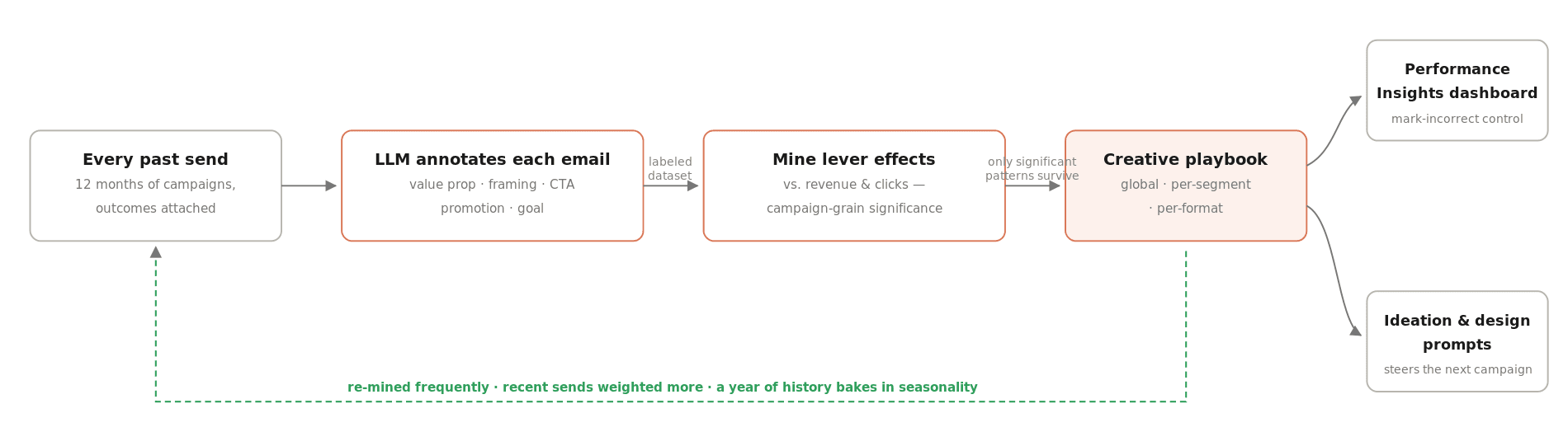
The slow loop starts with a reading step. A set of AI agents goes through every campaign the brand has sent and annotates each one with structured creative levers: what the value proposition was, how it was framed, the call-to-action style, the promotion type, and the goal of the email. That turns an archive of past emails into a labeled dataset, which is the step that makes history minable at all.
The levers are then aggregated against real revenue and click outcomes and mined for patterns, with significance tested at the campaign level rather than the individual-send level, so a recurring weekly send cannot manufacture false confidence.
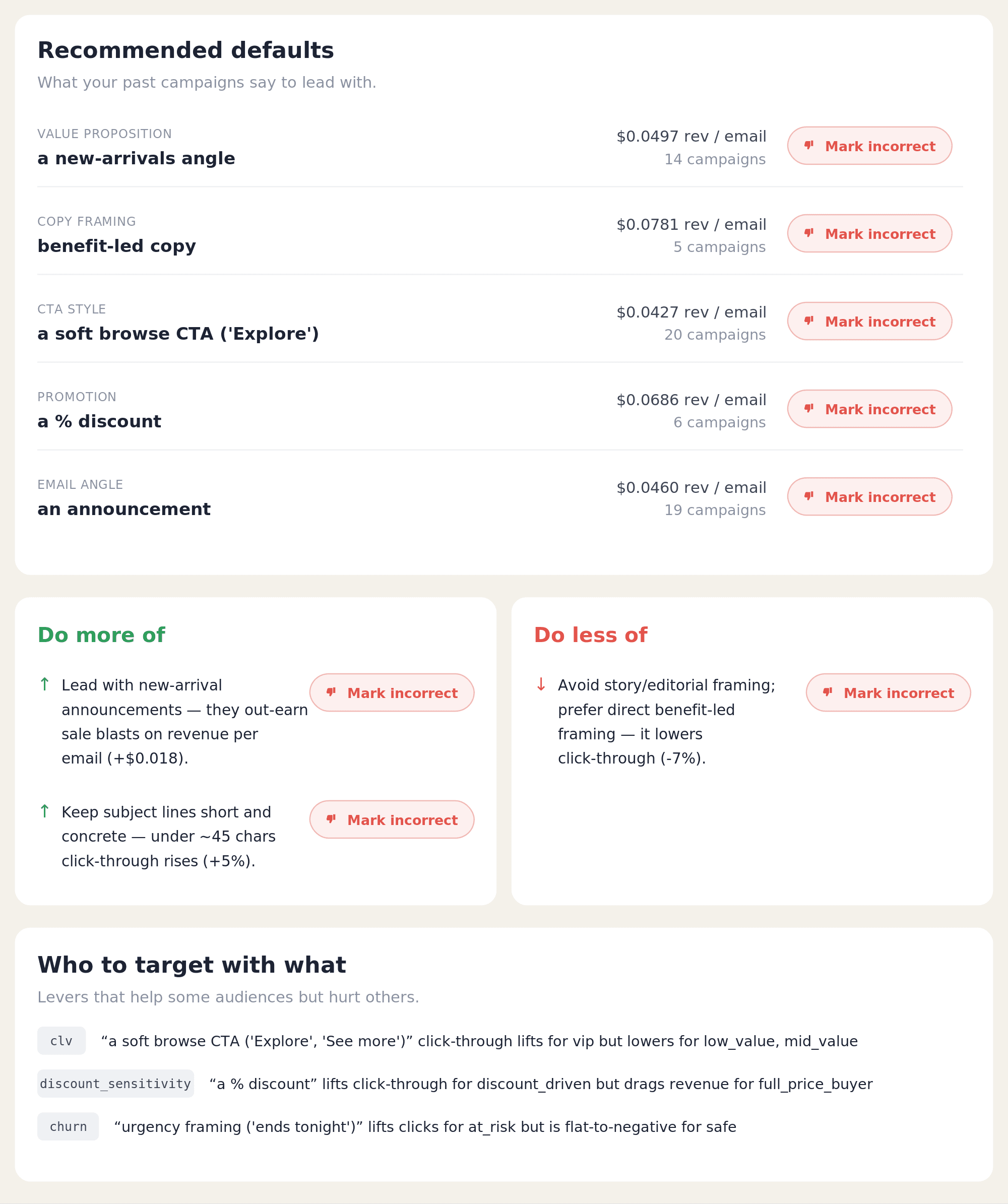
Only the patterns that survive that test surface in the dashboard's Performance Insights section; weak or noisy patterns are computed but never shown. And each surfaced insight can be marked incorrect by the brand, which removes it from the loop, so the playbook is auditable rather than a black box.
The mining reruns frequently, with recent sends weighted more heavily than older ones, over up to a year of history. That window is long enough that seasonality is baked into the evidence, so the playbook knows a discount framing that works in Q4 may not work in spring, rather than reporting one flat year-round average.
How it stays honest and compounds
The playbook is humanized into guidance and injected into the systems that generate ideas, write subject lines, and design emails, fused with the reviewer-feedback guardrails, as one of the priors in the evaluation stack. It tilts the odds; it never decides, and the holdout has the final word.
Every send adds to the history the playbook is mined from, so the priors sharpen and get better-targeted per segment and format over time. The brand's sense of "what works here" is never finished; it is continuously recomputed from real outcomes.
Frequently asked questions
Is the playbook causal? No. It is treated as correlational and used as a prior. Causation is established by holdout measurement.
Why test at the campaign level? So a repeated weekly send cannot fake statistical significance.
What if I disagree with an insight? Mark it incorrect on the dashboard and it stops steering generation.
Does last year's Black Friday skew my playbook? No. Recency weighting plus a year-long window means seasonal effects are recognized as seasonal, not extrapolated across the whole year.
Part of the machine learning behind LTV.ai.
See it on your store: book a demo.